The main dangers of the Internet include phishing, malware, online scams, data theft, cyberbullying, grooming, sextortion, disinformation, loss of privacy and excessive screen time. The good news is that many of these risks can be prevented with simple habits: strong passwords, two-step verification, common sense before clicking, and good digital literacy.
The Internet is not dangerous in itself. It is a powerful tool for learning, working, shopping, communicating and entertainment. Problems arise when we use the Internet without understanding its risks or trust messages, links, profiles or websites too quickly without verifying them.
Quick summary: to prevent Internet dangers, do not open suspicious links, use different passwords for each account, enable two-step verification, keep your devices updated, review your social media privacy settings, and talk to minors about cyberbullying, grooming, sextortion and inappropriate content.
What are the main dangers of the internet?
The dangers of the internet can affect anyone: children, teenagers, adults, older people, businesses and families. Some risks are technical, such as viruses or phishing attacks. Others are social or personal, such as cyberbullying, exposure of private data or contact with strangers.
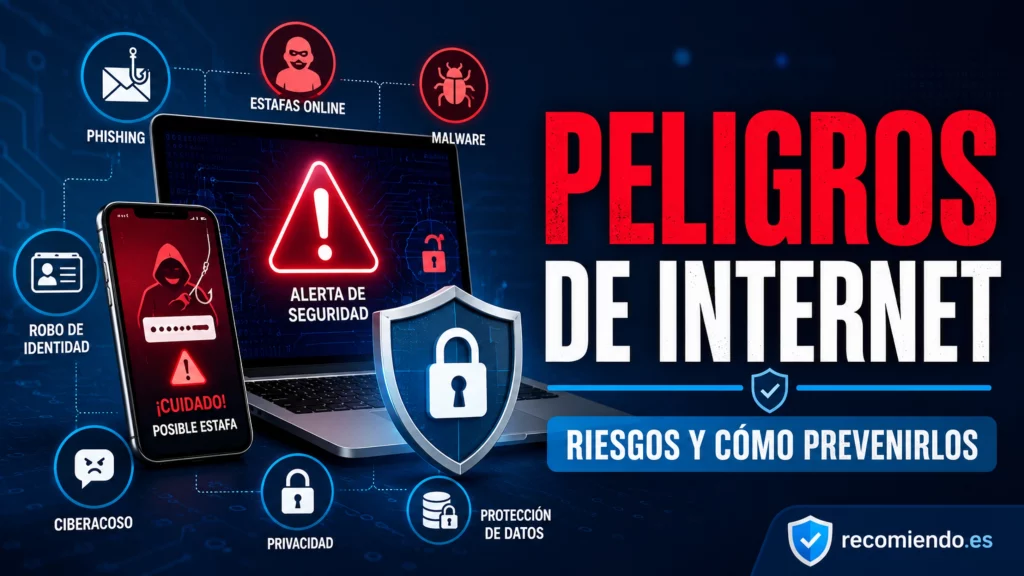
Here are the most important risks to be aware of:
- Phishing: fake messages designed to steal passwords, banking details or personal information.
- Malware: malicious software that can infect your computer, mobile phone or tablet.
- Ransomware: an attack that locks files or devices and demands a ransom to restore access.
- Online scams: fake stores, fraudulent investments, misleading prize draws or nonexistent products for sale.
- Identity theft: using your data to impersonate you.
- Cyberbullying: insults, threats, humiliation or the spread of content intended to harm someone.
- Grooming: adults manipulating children online.
- Sextortion: blackmail involving intimate images or private information.
- Misinformation: fake news, hoaxes and manipulated content.
- Loss of privacy: excessive exposure of personal data, photos, location or habits.
1. Phishing: emails and messages designed to trick you
Phishing is one of the most common dangers on the internet. It involves impersonating a company, bank, delivery service, social network or government agency to trick users into sharing personal information or clicking a malicious link.
You may receive phishing messages by email, SMS, WhatsApp, social media or even phone calls. They often use urgent phrases such as:
- “Your account will be blocked.”
- “You have a package waiting.”
- “Update your payment details.”
- “You’ve won a prize.”
- “Confirm your password.”
How to Prevent Phishing
- Don’t open links in suspicious messages.
- Don’t download files from unknown senders.
- Always check the sender’s actual email address or phone number.
- Don’t send passwords or banking details by email or messaging apps.
- Visit the official website by typing its address into your browser.
- Enable two-step verification on your important accounts.
Practical tip: If a message pressures you, scares you or promises something that seems too good to be true, stop before clicking. Urgency is one of the most common techniques used in online scams.
2. Malware, viruses and malicious software
Malware is any software designed to damage, spy on, steal information from or control a device without permission. It can get onto your computer or mobile phone when you download files, install pirated software, open infected attachments or visit dangerous websites.
Some signs of infection may include:
- Your device is running much more slowly.
- Strange pop-up windows appear.
- Programs you don’t remember installing appear.
- Your browser’s homepage changes.
- You receive constant security alerts.
- Your contacts receive strange messages from your accounts.
How to prevent malware
- Keep your operating system up to date.
- Install apps only from official sources.
- Don’t download cracks, pirated software or suspicious files.
- Use antivirus protection or your system’s security tools.
- Make regular backups.
- Don’t give apps unnecessary permissions.
3. Ransomware: when your files are locked
Ransomware is a type of malware that encrypts or locks files and then demands money to recover them. It can affect individuals as well as businesses, schools, local councils, and other organisations.
The biggest problem with ransomware is that, without a backup, recovering your information can be very difficult. That’s why prevention is far more important than reacting after the damage has been done.
How to protect yourself from ransomware
- Back up your files to the cloud or external drives.
- Don’t open unexpected attachments.
- Keep your software and operating system up to date.
- Don’t install software from untrusted sources.
- Be wary of invoices, quotes, or documents you weren’t expecting.
4. Online scams and fake purchases
Online scams are becoming increasingly varied. They can take the form of fake shops, social media ads, supposed investment opportunities, nonexistent giveaways, unusually cheap rentals, products that never arrive, or websites that imitate well-known brands.
A scam often has one or more of these warning signs:
- A price much lower than usual.
- A recently created website or one with little legal information.
- Texts that are poorly translated or contain unusual errors.
- Only accepts bank transfers, Bizum or payment methods that are difficult to dispute.
- There is no address, information about the company responsible or clear terms and conditions.
- Comments or reviews that seem too perfect.
How to shop more safely
- Look for independent reviews of the store.
- Check that the website has a legal notice, privacy policy and contact details.
- Use secure payment methods.
- Be wary of deals that seem too good to be true.
- Don’t buy anything through links received in suspicious messages.
5. Identity theft and impersonation
Identity theft occurs when someone uses your data, photos, accounts or personal information to pretend to be you. They may use it to create fake profiles, scam your contacts, ask for money, access services or damage your reputation.
The risk increases when we share too much information: date of birth, city, school or university, workplace, photos of documents, vehicle registration numbers, location or daily routines.
How to prevent identity theft
- Don’t publish personal documents.
- Never share verification codes.
- Use unique passwords for each account.
- Turn on two-step verification.
- Check for active sessions on social media and email accounts.
- Adjust the privacy settings on your profiles.
6. Loss of privacy on social media
Privacy is one of the major dangers of the internet because it is often lost without us realising it. We post photos, locations, opinions, trips, routines and personal information that others can see, copy or use.
Even if you delete a post, someone may have taken a screenshot, saved the image or shared the content. That is why it is important to think before you post.
What information should you avoid posting?
- Home address.
- Personal phone number.
- National ID card, passport or other documents.
- Real-time location.
- Photos of children without taking care.
- Tickets, passes or booking confirmations with visible codes.
- Passwords, vehicle registration numbers or banking details.
It is also important to be cautious about sharenting, which means sharing excessive information about children or minors on social media.
7. Cyberbullying
Cyberbullying is bullying carried out via the internet, social media, messaging apps, online video games or digital platforms. It can include insults, threats, spreading rumours, posting private images, excluding someone from groups or repeatedly mocking them.
It is particularly concerning for children and teenagers because it can have significant emotional effects, including anxiety, fear, isolation, poor school performance or low self-esteem.
How to Respond to Cyberbullying
- Don’t respond with further attacks.
- Save evidence: screenshots, messages, dates and profiles.
- Block and report the bully on the platform.
- Talk to an adult, your school or someone you trust.
- If there are threats or intimate content is shared, seek specialist help.
8. Grooming: A Serious Danger to Minors
Grooming occurs when an adult tries to gain a minor’s trust in order to manipulate them, obtain intimate images or abuse them. It may begin with seemingly innocent conversations, gifts, compliments or fake profiles.
It is one of the most serious risks for children and teenagers online because the perpetrator often acts gradually, building a relationship of trust and emotional dependence.
Warning Signs of Grooming
- An adult or stranger insists on speaking privately.
- They ask you to keep the conversation secret.
- They send gifts, money, video game skins, or digital perks.
- They ask for personal or intimate photos.
- They try to isolate the child from their parents or friends.
- They suggest meeting in person.
To learn more about this topic, you can link to a dedicated guide such as grooming: what it is, how to spot it, and how to prevent it.
9. Sextortion and intimate image blackmail
Sextortion is blackmail involving intimate images, videos, or conversations. The perpetrator threatens to publish or send this content unless the victim pays money, sends more material, or meets certain demands.
It can affect both adults and children. Sometimes it starts with a trusting relationship, a fake account, or a conversation on social media. Then, once the person shares intimate content, the threats begin.
What to do if you are being sextorted
- Do not pay or send any more content.
- Do not delete the evidence.
- Take screenshots of messages, profiles, and threats.
- Block and report the account.
- Seek help from someone you trust or from professionals.
- If children are involved or there are serious threats, act as soon as possible.
10. Fake News, Hoaxes and Disinformation
Another danger of the internet is disinformation. Fake news can affect health, politics, the economy, safety or social harmony. Much of it is designed to provoke fear, anger or a quick reaction.
Before sharing a news story, it’s worth asking yourself:
- Is the source reliable?
- Has the story been reported by other reputable outlets?
- Is it dated?
- Does the headline seem overly alarmist?
- Does it include verifiable facts?
- Is it pushing me to share without thinking?
Sharing hoaxes can also cause harm. The best way to prevent this is to verify information before sharing it.
Internet Dangers for Children and Teenagers
Children and teenagers may be exposed to many of the same risks as adults, but have less experience identifying them. That’s why simply banning internet use isn’t enough: they need guidance, explanations and an environment of trust.
The main risks for children and teenagers are:
- Cyberbullying.
- Online grooming.
- Sextortion.
- Contact with strangers.
- Violent, sexual or inappropriate content.
- Dangerous viral challenges.
- Excessive exposure of personal information.
- Compulsive screen use.
Tips for Families
- Talk about the internet before a problem arises.
- Explain that not every profile belongs to a real person.
- Teach them not to share intimate photos or personal information.
- Review the privacy settings of social media accounts and online games together.
- Agree on reasonable schedules and limits.
- Build trust so they feel able to ask for help without fear of disproportionate punishment.
Key takeaway: The best protection for a minor isn't just a parental control app. They should also know how to recognise risks, ask for help and talk to an adult when something makes them uncomfortable.
How to Prevent Online Dangers: A Quick Guide
Prevention doesn't rely on a single measure. Ideally, it combines technical security, privacy and digital literacy.
| Risk | How to prevent it | Warning sign |
|---|---|---|
| Phishing | Don't open suspicious links, and verify the sender. | An urgent message asking for personal details or a password. |
| Malware | Keep devices up to date and download only from official sources. | Unfamiliar programs, slow performance or pop-up windows. |
| Identity theft | Use unique passwords and two-step verification. | Unknown logins or fake profiles. |
| Cyberbullying | Block, report, and save evidence. | Repeated insults, threats, or humiliation. |
| Grooming | Digital education and monitoring contacts. | An adult who asks for secrets, photos, or to meet up. |
| Misinformation | Check the source, date, and facts before sharing. | Alarmist headlines or content with no clear source. |
Basic security measures for all users
These measures should be followed in almost any situation, by both adults and minors:
- Use long, unique passwords for each account.
- Turn on two-step verification.
- Update your operating system, browser, and apps.
- Don’t install apps from outside official app stores unless you know what you’re doing.
- Review app permissions: camera, microphone, contacts, and location.
- Don't use public Wi-Fi networks for sensitive transactions without protection.
- Back up your photos, documents, and important files.
- Log out of shared devices.
- Review your social media privacy settings.
- Be wary of messages involving urgency, prizes, or threats.
What to Do If You've Already Fallen Victim to a Scam or Attack
If you think you've fallen victim to an online scam, phishing, account theft, or malware, act quickly:
- Change the password for the affected account.
- Turn on two-step verification if you haven't already.
- Log out of active sessions on other devices.
- Contact your bank if you've shared payment details.
- Scan your device with a security tool.
- Save evidence: emails, screenshots, links, phone numbers, and receipts.
- Notify your contacts if they might receive fake messages from your account.
- Report the profile, website, or message on the platform.
Common mistakes that increase the risks of using the internet
Many problems aren’t caused by a lack of advanced knowledge, but by unsafe habits. Here are some very common mistakes:
- Using the same password everywhere.
- Sharing too much personal information.
- Thinking, “It won’t happen to me.”
- Opening attachments without checking who sent them.
- Installing apps without reviewing their permissions.
- Saving passwords in visible notes or chats.
- Not updating your phone or computer.
- Trusting people with unknown profiles.
- Sharing your location in real time.
- Not talking to children about digital risks.
So, how can you browse the internet safely?
To browse the internet safely, you need to combine caution, privacy, and good technical habits. It’s not about being afraid of the internet, but about using it wisely.
The simplest formula would be:
- Before clicking: consider whether the link or message makes sense.
- Before posting: ask yourself whether you would mind if that content were copied or shared.
- Before buying: check whether the website seems trustworthy.
- Before trusting someone: remember that a profile could be fake.
- Before ignoring an unusual warning sign: save evidence and ask for help.
The internet can be an excellent tool, but it requires responsible use. Strong passwords, updates, well-configured privacy settings and digital literacy can help reduce many of the most common risks.
Frequently Asked Questions About Internet Risks
What are the most common risks on the internet?
The most common risks include phishing, malware, online scams, identity theft, cyberbullying, grooming, sextortion, fake news, loss of privacy and excessive screen time.
How can you prevent internet risks?
You can prevent them by using strong passwords, enabling two-step verification, keeping devices up to date, avoiding suspicious links, reviewing your privacy settings and talking to children about online safety.
What is phishing?
Phishing is a deceptive technique that uses fake messages to steal personal data, passwords or banking information. These messages often imitate banks, companies, social media platforms or well-known services.
What risks does the internet pose to children?
Children may be exposed to cyberbullying, grooming, contact with strangers, inappropriate content, sextortion, dangerous challenges, loss of privacy and excessive screen time.
What should I do if I’ve fallen for an online scam?
Change your passwords, enable two-factor authentication, contact your bank if you shared payment details, save any evidence, report the fraudulent account or website, and alert your contacts if your account has been compromised.
Can posting on social media be dangerous?
Yes, if you share personal details, your location, documents, intimate photos, routines, or information about minors. Once something is posted, other people can copy, save, or share it.